Maho 26.9.0 is out today!
Every release so far rebuilt something inside Maho. This one changes the first thing a shopper sees: 26.9.0 ships a brand-new storefront built on Tailwind CSS 4 and daisyUI 5, with eleven ready-made themes and a live theme editor in the admin. Around it, the pieces a modern store is expected to have: social login, a WCAG accessibility scanner, an MCP server for AI agents, an AI-agent-ready storefront, a native job queue and OpenTelemetry observability.
With 26.9.0, Maho gets a brand-new face, and it is ready for the agents.
Highlights
- New storefront: compiled Tailwind CSS 4 + daisyUI 5 skin, eleven themes in light and dark, no build step to use them.
- Live theme editor: colors, fonts, radii and more from an admin form, with a live preview pane.
- Social login: Google, Apple and Facebook, with account linking and the Magic Link flow.
- WCAG accessibility scanner: axe-core audits from the admin, violations outlined on a screenshot and mapped to the template.
- MCP server: 201 tools on a default install, OAuth 2.1 browser login, same permissions as REST.
- AI-agent-ready storefront:
robots.txt,llms.txtand a markdown version of every page. - Async job queue: Symfony Messenger on your database and cron, with worker pools and an admin grid.
- OpenTelemetry: traces, metrics and logs over OTLP to any backend you already run.
New features and major improvements
A new storefront: Tailwind CSS 4, daisyUI 5, eleven themes and a live theme editor
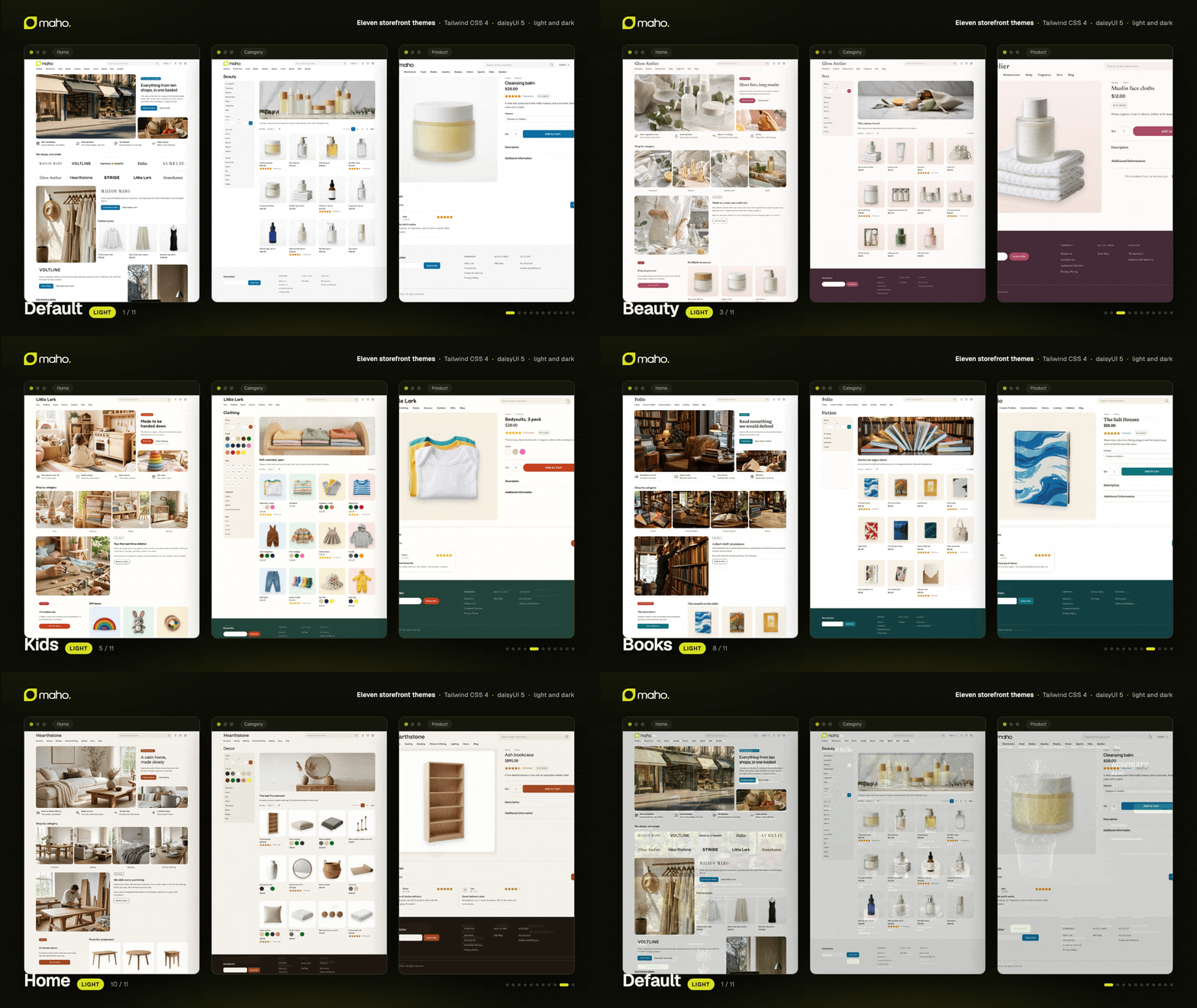
We wanted this for so long: a completely new frontend design stack, based on the best and most modern technologies, and now it's finally here! The base design package is a compiled Tailwind CSS 4 + daisyUI 5 skin, and it is what a fresh install shows. On top of it ship eleven themes, one per kind of shop: a neutral default, then fashion, electronics, food, books, jewelry, beauty, home, sports, kids and garden. Each one is a finished storefront with its own type, palette and rhythm, and each one (food and kids excepted, on purpose) comes in light and dark.
A theme is about a hundred lines of theme.css: design tokens and a handful of rules, no forked template. All eleven run on the same catalog, checkout and admin, and you can click through every one of them on the demo store or in the theme gallery.
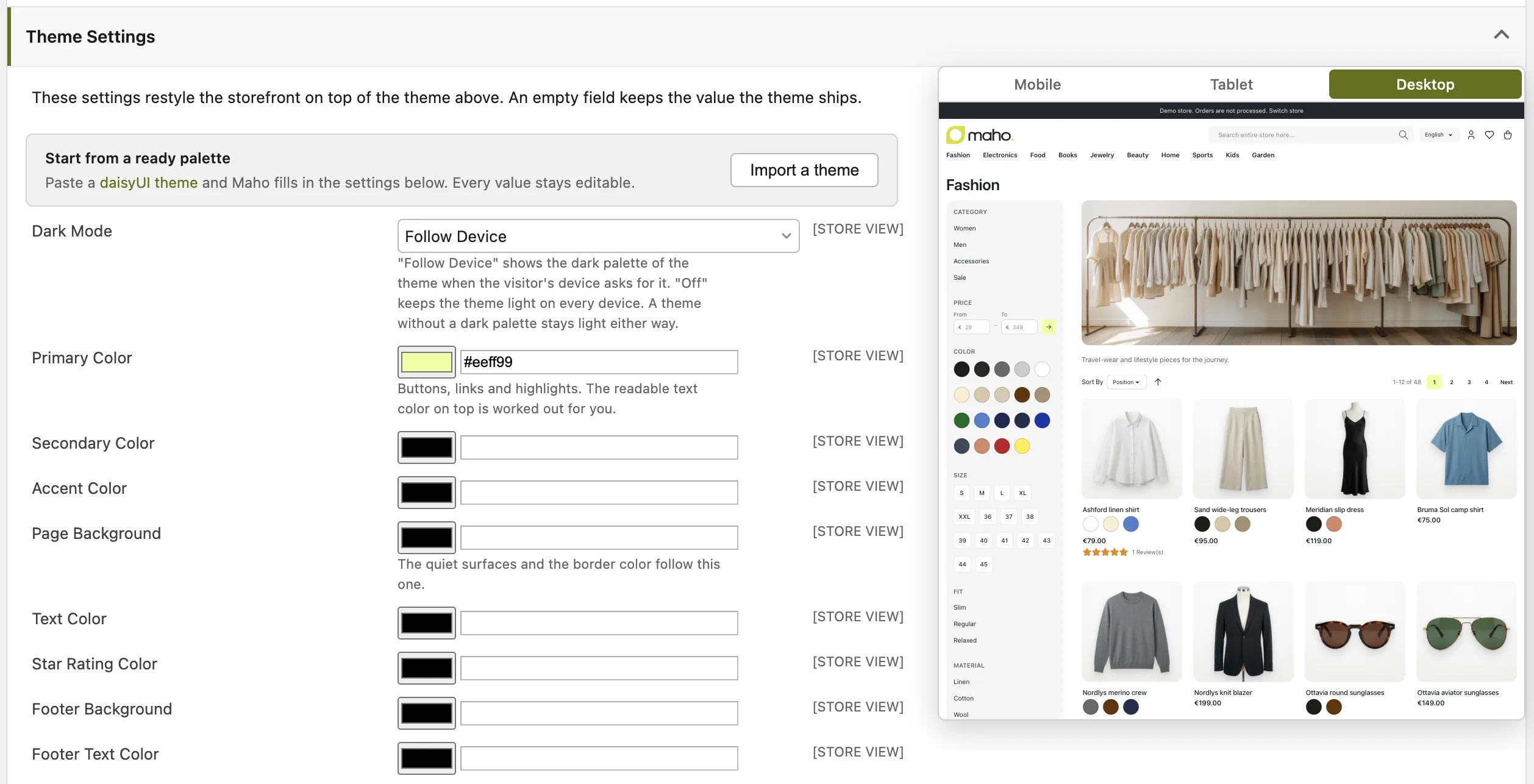
The important part for non-technical people is Theme Settings, under System > Configuration > Design. Colors, fonts, radii, border width, control size, raised or flat surfaces and a custom CSS box, per website or per store view, with the storefront repainting live in a preview pane as you type. Paste any daisyUI theme and Maho fills the form in. An empty field keeps the value the theme ships. Nothing is compiled, nothing is deployed: a merchant restyles the shop from a form, and a developer keeps an upgrade-safe child theme for the rest.
./maho dev:frontend:theme:buildcompiles a theme (--theme,--watch),dev:frontend:theme:createscaffolds a new one,dev:frontend:theme:exportwrites the admin settings out as atheme.css
Read the theme development guide for the customization tiers, from an admin form to a child theme.
Social login with Google, Apple and Facebook
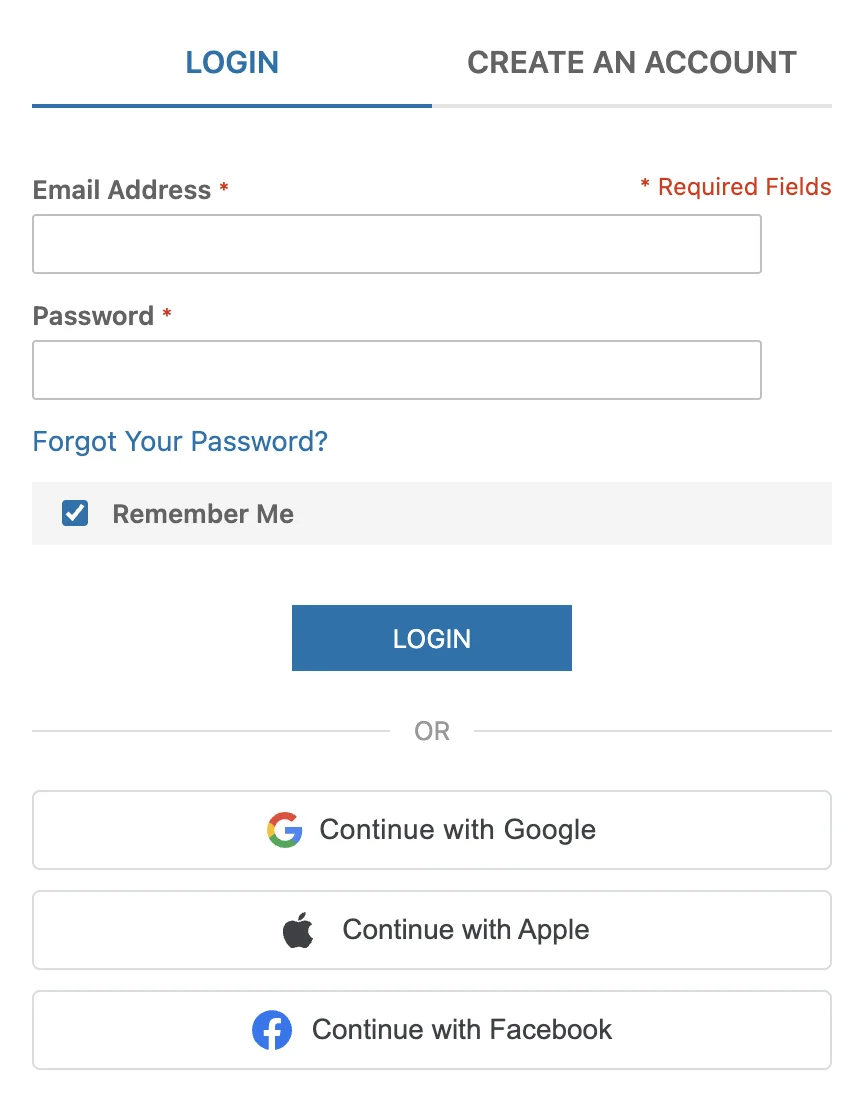
There isn't much to say about this amazing new feature, right?
- An existing account with a matching provider-verified email is linked automatically; otherwise a new account is created, gated by an "Allow New Accounts via Social Sign-In" setting, and a customer with missing required profile fields is sent to complete them
- Login follows the Magic Link flow, including the 2FA challenge; guest carts merge
- Identities are website-scoped and can be unlinked from a "Connected Accounts" page in My Account or from a "Social Login" tab on the admin customer page
Documentation is in the social login guide.
WCAG accessibility scanning with Playwright and axe-core
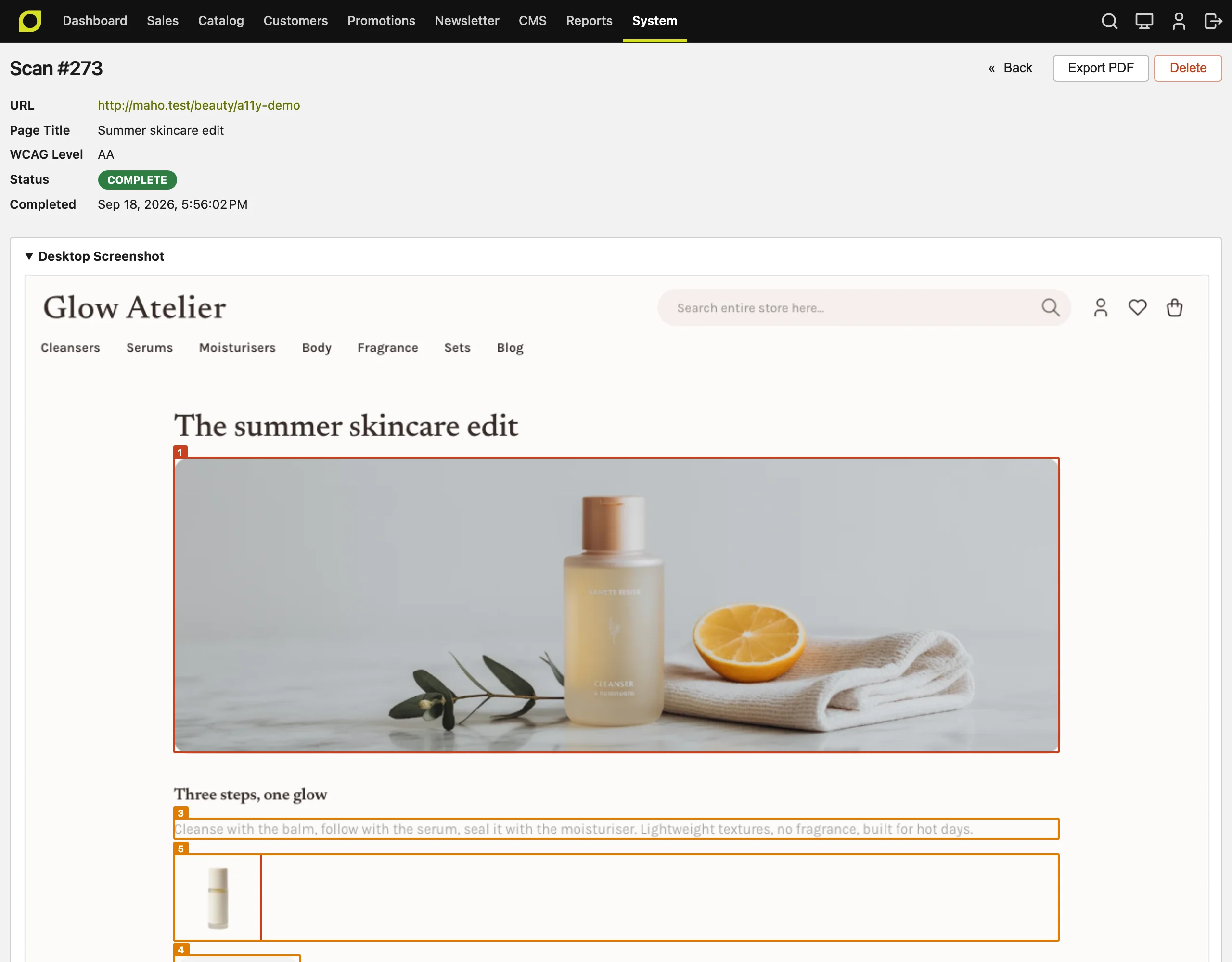
Accessibility is a serious topic, and in many regions of the world it's mandatory by law. That's why we think your ecommerce platform should provide you at least with the basic tools built in!
Accessibility audits used to mean an external tool, a PDF and a developer guessing which template produced line 4 of the report. The new Maho_AccessibilityScan module (inspired by Lens for Laravel) runs the audit from the admin, against your own pages, at the WCAG level you choose.
- Every violation is outlined and numbered on a full-page screenshot, desktop and mobile, and mapped back to the
.phtmltemplate and, best effort, the line that produced it - Scheduled scans of an admin-configured URL list, with retention cleanup, and PDF export for the people who still want the PDF
./maho accessibility:scan --url … --threshold Nfor CI/CD pipelines- The template mapping uses a single-use token, so template hints are force-enabled in memory for the scanner only and normal visitors are unaffected
Read the accessibility scan guide for the setup and the scan reports of every theme.
Store-facing MCP server with OAuth 2.1 browser login
Paste your store URL into Claude, ChatGPT or any MCP client, log in to your own admin panel, approve the connection, and the agent can work with your store. The POST /api/mcp endpoint is opt-in under System > Configuration > Services > API, like every other protocol.
Tools are derived from the same ApiResource metadata that drives REST and GraphQL, so every resource, third-party ones included, becomes a set of tools with no per-tool wiring: 201 tools on a default install, from catalog_products_list to sales_orders_get. A tool call runs the identical provider/processor pipeline as the matching REST request, so it inherits the security expression, role permissions, admin ACL, write logging and rate limiting.
The MCP protocol packages are optional: composer require them only when you turn the protocol on. Details in the MCP server documentation.
AI-agent-ready storefront: robots.txt, llms.txt and markdown pages
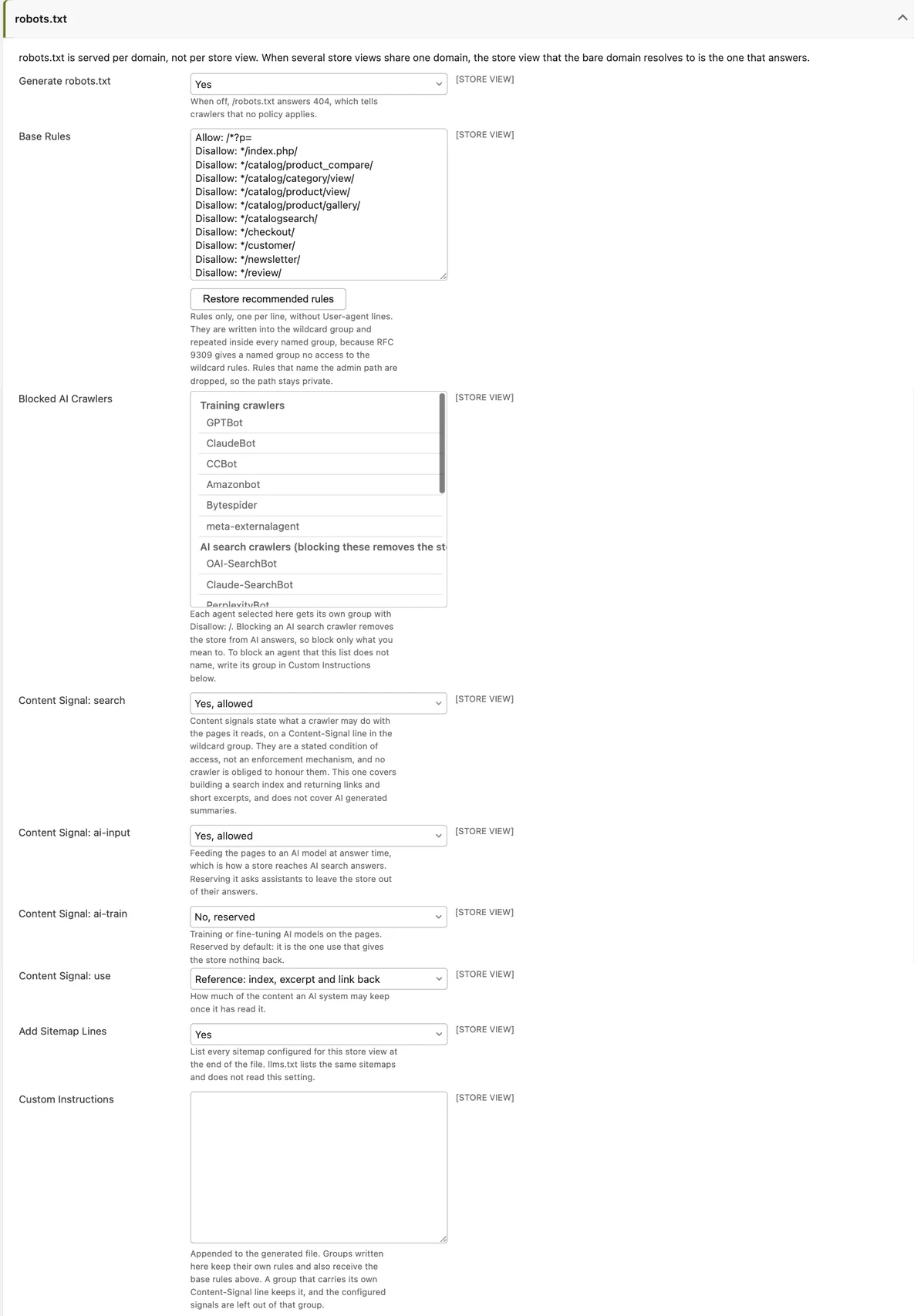
More and more of your traffic will be an agent shopping on someone's behalf. Two pieces give it a clean way in, and give you control over which ones you let in.
- robots.txt generation with RFC 9309 group handling and AI crawler controls: Maho shipped no
robots.txtat all. A per-store-view generator now serves one per domain from the new General > Crawlers & AI Agents section. It repeats the base rules inside every named user-agent group, because under RFC 9309 aUser-agent: GPTBotgroup inherits nothing from the wildcard and silently exposes everything. Blocked AI crawlers are grouped by purpose, so you can keep the store in AI answers while blocking training bots llms.txtandllms-full.txt: store name, description, locale, currency, CMS pages, blog, top-level categories, search URL and sitemaps per store view, plus an admin-editable markdown block. The product JSON-LD is completed too, withseller,itemCondition,priceValidUntil,OfferShippingDetails,MerchantReturnPolicy,ProductGroup/hasVariantfor configurables and length-specific GTIN properties Full documentation is in the AI and crawlers guide.
Markdown pages for AI agents
An AI agent that reads a product page as HTML pays for the navigation, the scripts, the styles and the tracking code before it reaches the product. Most of that budget is wasted, and the agent still has to guess which part of the page is the price. So Maho now answers with markdown instead of HTML when an agent asks for it, on the same URL. Browsers and search engines keep the HTML page they always got.
An agent can ask in two ways: send the Accept: text/markdown header (Claude Code sends it by default), or append .md to the URL, so /women/ becomes /women.md and /lafayette-dress.html becomes /lafayette-dress.html.md. Both answer the same document.
The markdown version is not a dump of the page. It is written for a reader that wants facts:
- A product gives the name, SKU, price (with the regular price when a special price applies), availability, brand, GTIN, image URLs, the description, the "Additional Information" attributes, and one row per option of a configurable or grouped product with its own price and availability
- A category gives the description and the first 100 products as a table with link, SKU, price and availability, and points to the XML sitemap for the rest
- CMS pages and blog posts give the title and the content converted to markdown, with template directives resolved
Every HTML page announces its markdown version with a Link: rel="alternate" header, the markdown response is noindex so search engines never see a duplicate, and the output is cached per store and currency. It is on by default for catalog, CMS and blog pages, and you can restrict the routes or switch it off under Catalog > Crawlers & robots.txt.
Async job queue built on Symfony Messenger
Until now every feature that needed background work rolled its own: a cron here, a flag column there, a lost failure somewhere. Now there is one way, with retries, backoff, failure handling, worker pools driven by queue:work --pool, and an admin grid under System > Message Queue. Zero new infrastructure: everything runs on the database and the cron you already have.
The message queue guide covers dispatching messages, handlers and the worker pools.
Native OpenTelemetry observability: traces, metrics and logs over OTLP
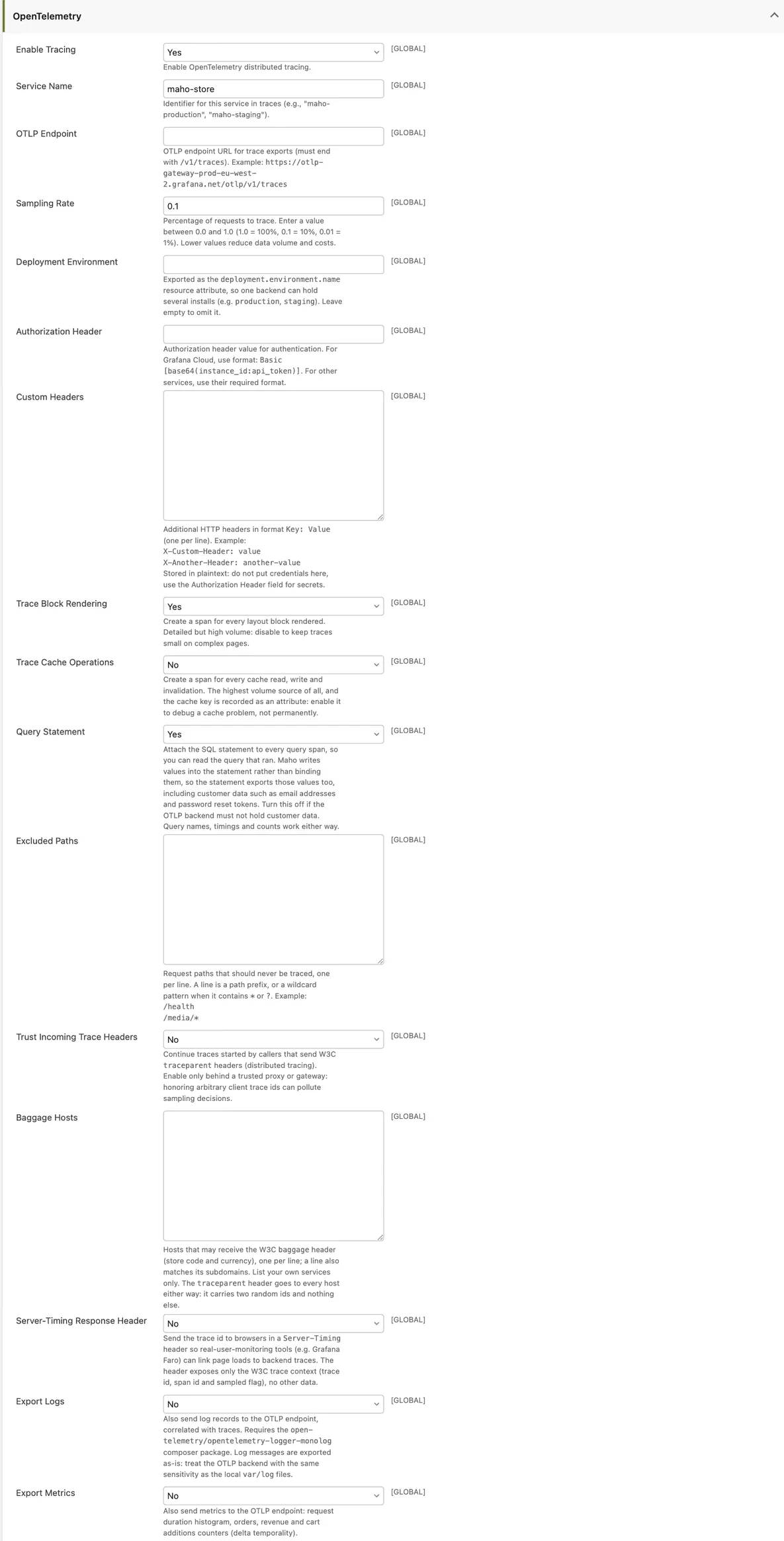
When a checkout is slow at 2am, "the site is slow" is not a diagnosis. OTLP is the vendor-neutral standard, so Maho now plugs into any observability backend that ingests it: Grafana Cloud, Sentry, Datadog, New Relic, Honeycomb, Elastic APM, Dynatrace, Jaeger, SigNoz, Axiom, Better Stack, or a self-hosted OpenTelemetry Collector. No vendor-specific code, no module per vendor. Off by default; three fields under Developer > OpenTelemetry (or the standard OTEL_* environment variables) are enough to start.
The SDK stays optional: composer require open-telemetry/sdk open-telemetry/exporter-otlp nyholm/psr7 when you switch it on. Setup is in the OpenTelemetry guide.
Major, but not headline
- Website prices now follow the currency rate instead of storing a converted copy. Maho used to write a converted price into every website at creation time and never update it, so the rate moved and prices did not. A price the merchant set for a website is used as is; otherwise the default-scope price times the current rate, computed when read
- A full currency sweep:
getCurrentCurrency()andgetCurrentCurrencyCode()could disagree, so amounts in one currency went out under the label of another. Rate lookups are centralized, incorrect price writes are prevented, and the storefront gains display-currency selection - FedEx migrated from SOAP to the REST API, since FedEx is retiring its SOAP services. Credentials move to an OAuth2 client id and secret
- Frankfurter and ExchangeRate-API currency services with automatic fallback, replacing the defunct CurrencyConverterAPI
- The REST/GraphQL API audited against the old SOAP surface: dates, cost, MSRP, GTIN/MPN, image labels, bundle attributes, group prices, customer fields, full inventory settings and more, so a SOAP-era integration can migrate without direct DB access. Plus cart checkout setter endpoints and admin-gated custom item prices
- Opt-in multi-select filters in layered navigation: "Nike or Adidas" within one facet, AND across facets
- A live progress dialog for admin reindexing, including a new Reindex All button, instead of a 504 on any real catalog
- Mandatory 2FA for admin users, with a cutover date and passkeys counting as enrollment
- Multi-website gift cards, a customer "Check Balance" page and rate-limited lookups
- Concurrent orders can no longer go past coupon, promotion and download usage limits: each counter moves in one
UPDATEthat refuses to exceed the limit - Drag-and-drop reordering for attribute options, accordion and tabs blocks in the WYSIWYG editor, inline SVG in content fields, and a warning listing the HTML a save removes from a content field
Upgrade notes
- Run
./maho migrateafter updating. The storefront answers 503 until the database matches the declared schema. - FedEx: enter your REST client id and secret after updating; the meter number, key and password fields are gone.
- Admin secret keys are always on: the
use_form_keytoggle is gone, andgetUrlSecure()with it. - Minimum PostgreSQL is now 15.
- 26.9 is the last release that supports PHP 8.3 and 8.4. Maho 26.11 requires PHP 8.5 or 8.6, so plan your PHP upgrade now (see the system requirements).
Database, security and code quality
The declarative schema introduced in 26.7.0 grows up: table and column renames are declared, so a migration never mistakes a rename for a drop plus an add. The schema is now InnoDB-only and migrate converts legacy MyISAM/MEMORY tables. The maho_ prefix is gone from core tables. health-check gains a table optimization check, and a new db:optimize command reclaims the space. Order placement on MariaDB 11.6+ is fixed.
On the security side, the admin secret key is always enforced, HTMLPurifier gives way to Symfony's HTML sanitizer with a single directive-safe filter, the SVG upload validator is allowlist-based, the unauthenticated RSS order feeds are gone, session keyspaces are isolated, and the admin JavaScript libraries moved from CDNs to npm-pinned local copies.
And the codebase keeps getting cleaner: 312 magic accessors in the Maho namespace became real typed methods (a __call() costs 6.7x a real call), every template declares its block class for PHPStan, php-cs-fixer now runs on .phtml files, and the Pest suite got much faster.
Be sure to check the full release announcement.
If Maho helps your business, consider supporting its development: