Maho 26.11.0 is out today!
26.11.0 is another huge one: an AI assistant on every admin page, a drag-and-drop page builder, a filesystem abstraction with S3, Google Cloud Storage and Azure for all media, a redesigned admin, product gallery layouts and SLSA Build Level 3 signed release packages. And under all of it, the foundation moves one major version up: PHP 8.5, Symfony 8.1 and API Platform 5.0.
It is also the first release for Maho Admin, our native app to run your store from your phone or tablet, now on Google Play and coming soon to the App Store!
Is that enough? Good, because we packed about 150 more changes into this release!
With 26.11.0, you can run your store by asking for what you need, from your desk or from your pocket.
Highlights
- Admin assistant: ask in plain language on every admin page, approve each write with the value before and after, undo it if needed.
- Maho Admin: the official app for iPhone, iPad and Android, talking straight to your own store.
- Page builder: a fullscreen drag-and-drop editor for CMS pages, CMS blocks and blog posts, with a live storefront preview.
- Cloud storage: media, uploads, downloads, sitemaps and feeds on S3, Google Cloud Storage or Azure, for several web nodes with no shared disk.
- Redesigned admin: daisyUI 5 components everywhere, light and dark, and a new login page that fits a phone.
- Product gallery layouts: thumbnails below, left or right, a grid, and a swipe carousel on phones.
- A full reindex three to five times faster, on MySQL, PostgreSQL and SQLite.
- PHP 8.5, Symfony 8.1, API Platform 5.0 and SLSA Build Level 3 signed release packages.
New features and major improvements
An AI assistant on every admin page
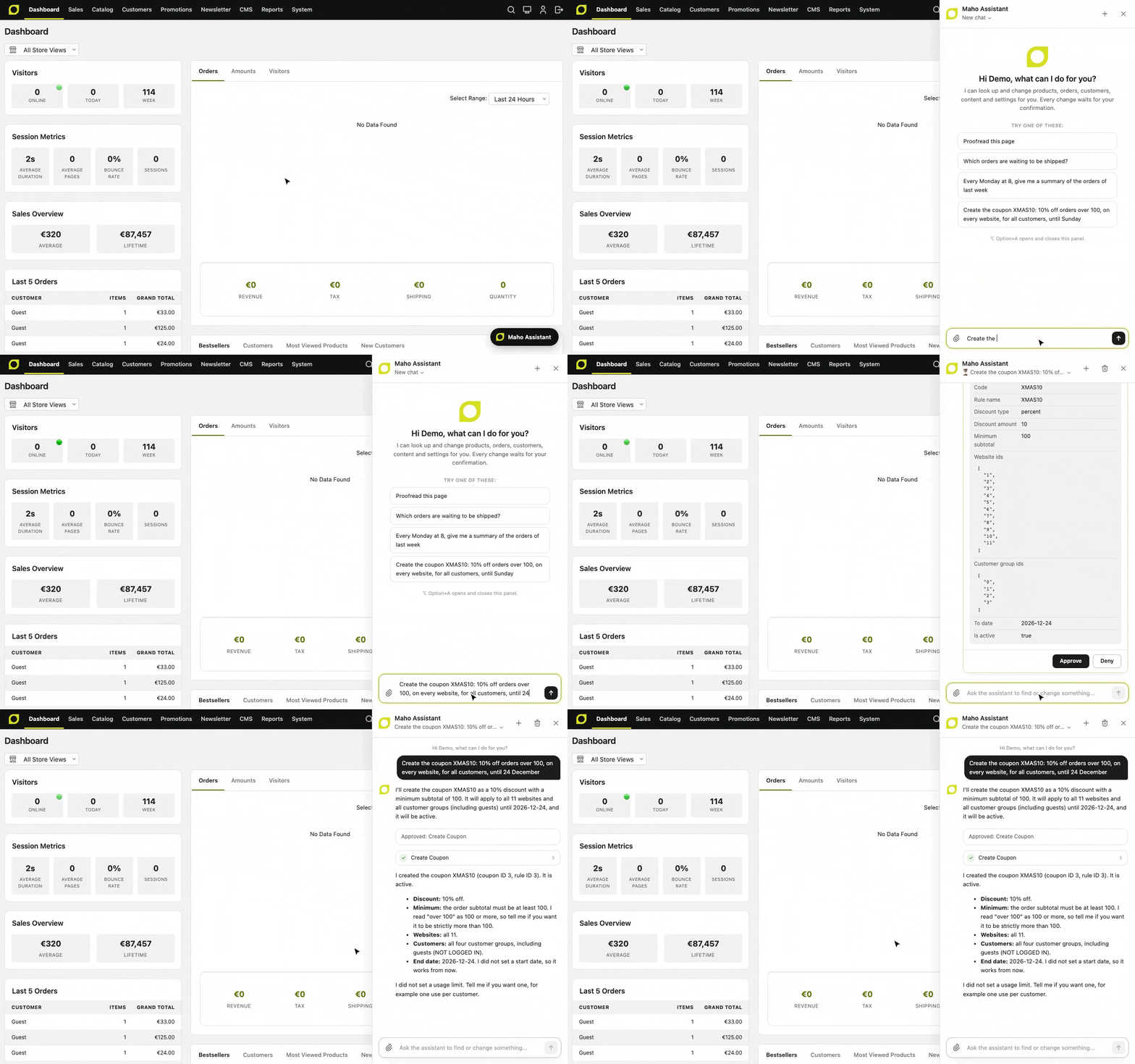
One typed sentence, one click on Approve, and the XMAS10 coupon is there. An admin user can now ask the assistant to read and change the store in plain language, from a panel on every admin page (Option+A or Alt+A). It reads the store through the same API tools that the MCP server exposes, answers with links to the records, and fills the open form on a record page without saving it.
The assistant never changes anything behind your back. Every write waits for a confirmation that shows the value before and after, and a confirmed update can be undone. System > AI > Assistant Actions Log lists every write that the assistant ran, denied or failed. And because the tools are the API tools, the assistant can do only what the role of the admin user allows.
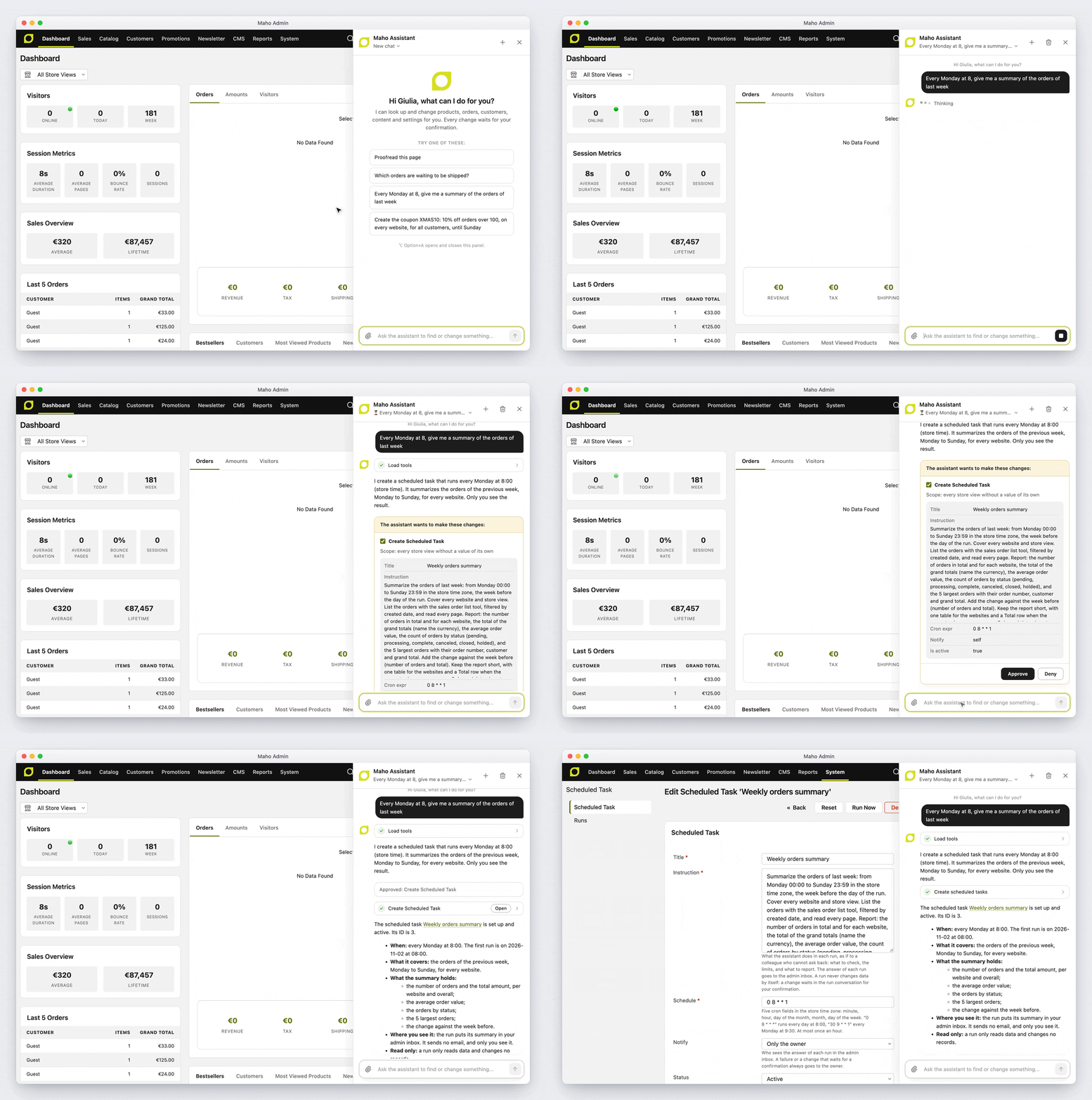
- Scheduled tasks: give the assistant an instruction to run on a schedule in System > AI > Assistant Scheduled Tasks, and read the result in the admin inbox
- It reads the user guide before it explains a feature, and it knows which docs page covers the admin page you are on. The user guide, developer, API and hosting docs of this website now live in the Maho repository, next to the modules they describe, so each store reads the pages of its own release
- Measured, not guessed: on a benchmark of 49 questions about swatches, catalog rules, settings and orders, Haiku 5.5 goes from 49% to 78% correct or honest answers and Sonnet 5.5 from 76% to 94%
- Any provider of the AI module works, Gemini included
- New API resources for the assistant, also open to REST, GraphQL and MCP clients: admin users and roles, cache types, config settings with their help text, design changes, email templates, themes, URL rewrites, index processes, widget types and catalog price rules
Turn it on in System > Configuration > AI > Assistant > Enable Admin Assistant.
Maho Admin: your store, in your pocket
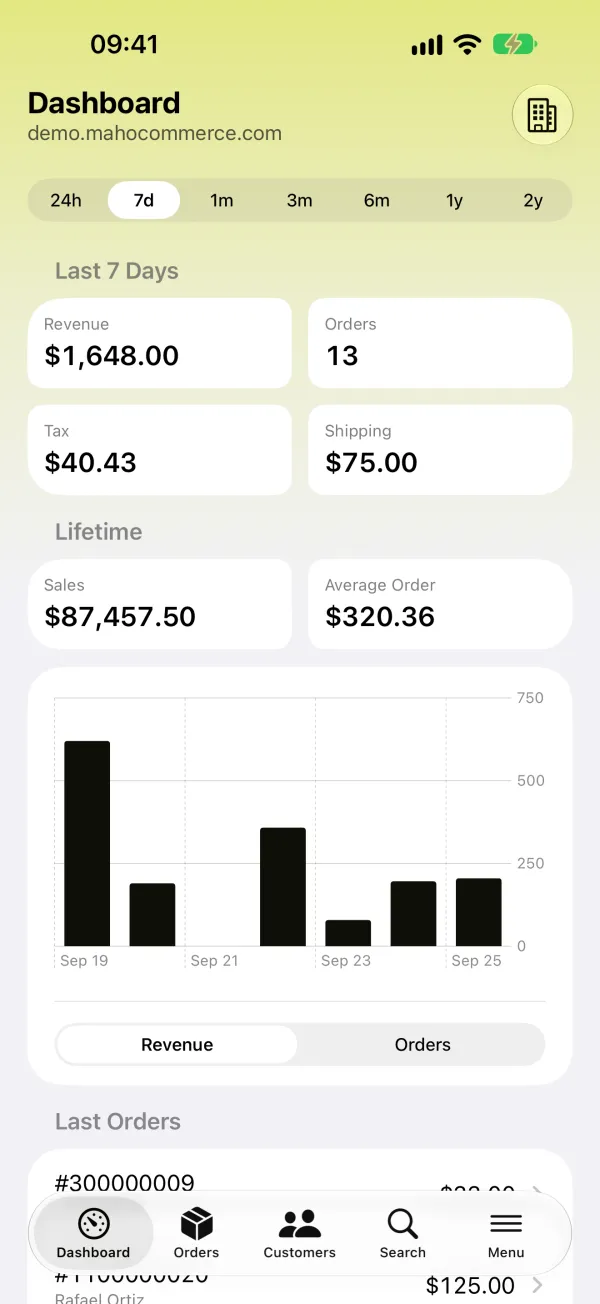
Maho Admin is the official app for Maho, and 26.11.0 is the first release it works with. Ship an order from the warehouse, fix a price on the train, check the sales from the sofa. The app talks straight to your own store, with no server of ours in the middle and no tracking.
- Sales, orders, bestsellers and visitors, for every website and store view
- Runs on iPhone, iPad and Android phones, tablets and foldables. It is on Google Play today, and coming soon to the App Store
- The connection uses the same OAuth flow as the MCP clients. A new Connect Applications permission lets an admin approve the app without the power to revoke the connections of every other admin, each admin sees and disconnects their own applications under System > My Account, and the OAuth consent page now works on a phone
- €9.99/month for one Maho instance, with all its websites and store views. Every subscription helps to fund Maho, and keeps it open, free and moving forward, for everyone
Find all the screens on the Maho Admin section of the home page.
A page builder for CMS pages, CMS blocks and blog posts
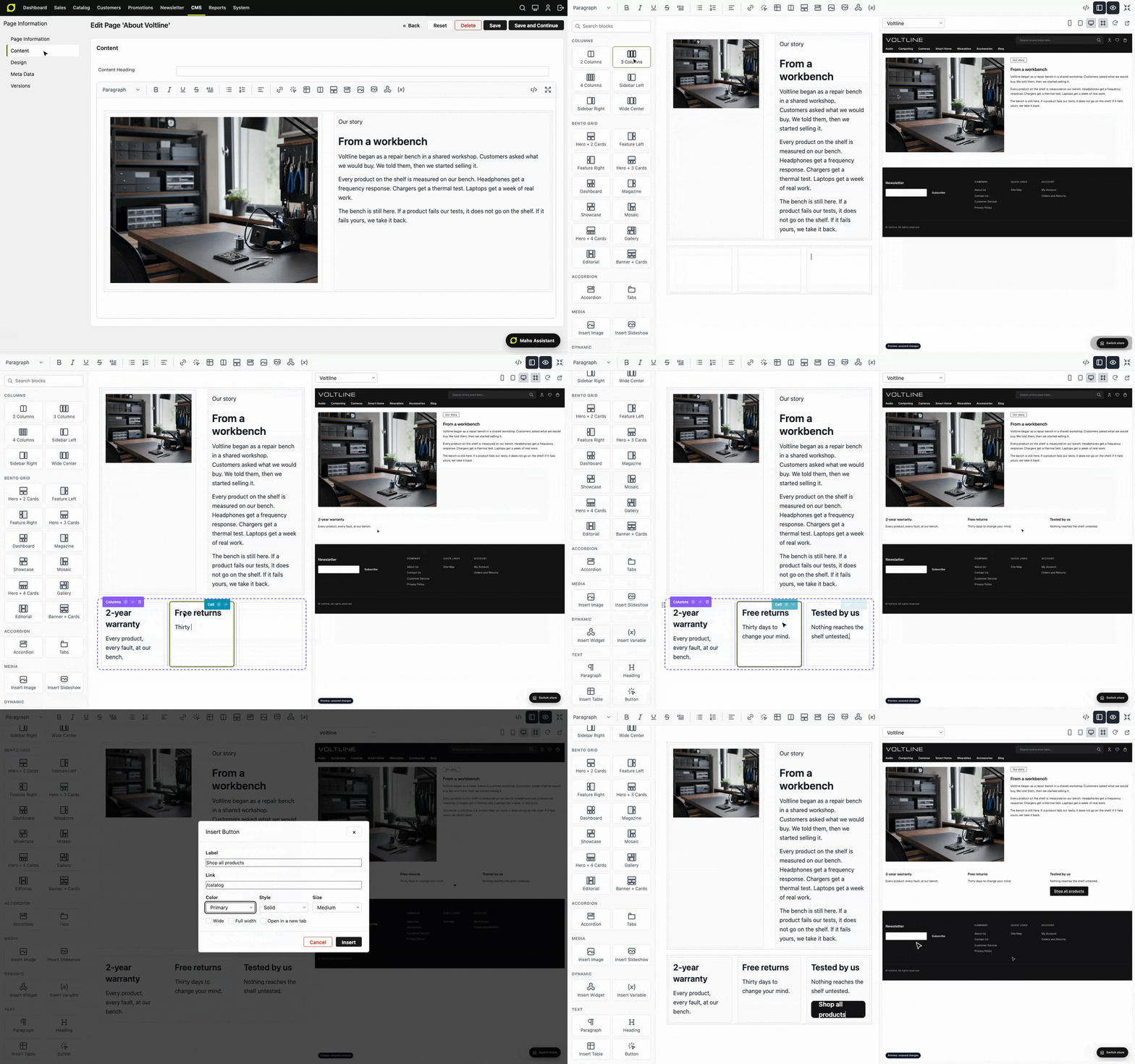
The content editor of CMS pages, CMS blocks and blog posts now opens as a fullscreen page builder. A Blocks pane on the left inserts columns, bento grids, accordions, tabs, images, slideshows, widgets and buttons, by click or by drag. A Preview pane on the right shows the unsaved content on the storefront, in the theme of the selected store view, as you type. The blocks take the default styles of the theme, so a page built here looks like the rest of the store.
This brings the Design Mode module of empiricompany/maho-design-mode into core: thank you!
- A Button dialog writes theme buttons with a label, a link, a color, a style and a size
- The drag handle moves a block, also out of a column, and Alt+ArrowUp/Down moves it from the keyboard
- The editor, also outside the page builder, now renders widgets and CMS blocks as the storefront does: a product list widget shows its products, prices and ratings instead of a placeholder
- The rich text editor keeps
<section>,<video>,<figure>,<dl>and the other HTML that a save keeps, instead of sending you to the plain HTML editor with a warning
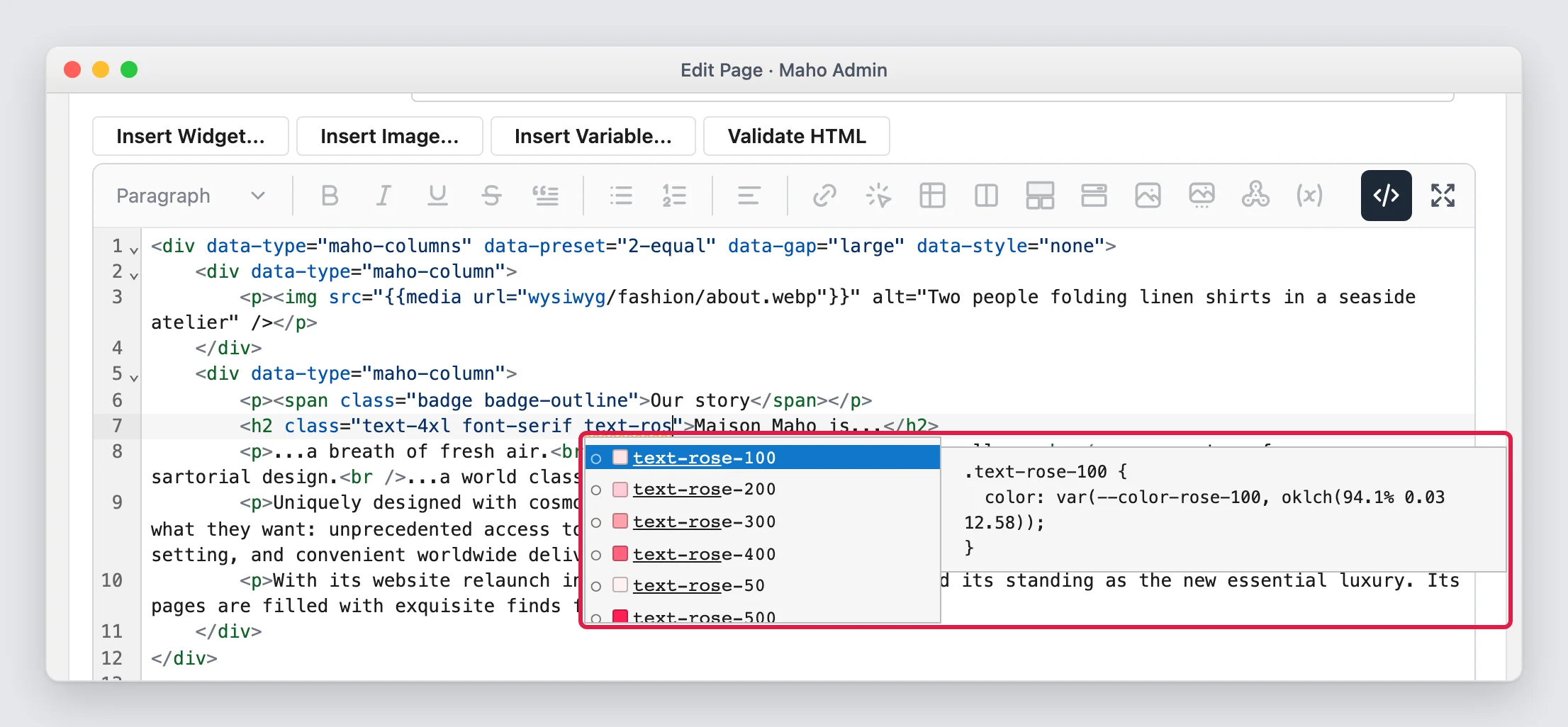
And for the people who prefer to write HTML: any Tailwind or daisyUI class now works in content, in CMS pages and blocks, blog posts, widgets, custom variables, footer fields and product or category descriptions. A new Source button opens the HTML in a code editor that completes the classes of the theme, shows the CSS of each one, and marks a class that the storefront does not style. On a server with Node.js and the Tailwind CLI, a save queues a build that compiles the used classes.
Read the content HTML and classes guide and the Tailwind content build guide.
Media, uploads, downloads, sitemaps and feeds on S3, Google Cloud Storage or Azure
A store can now run on several web servers with no shared disk. Every file that the nodes must share (media, private customer uploads, downloadable products, sitemaps, feeds, Dataflow files, import and export files) goes through a named storage mount, and app/etc/local.xml points each mount at S3 or an S3-compatible store (Cloudflare R2 included), Google Cloud Storage or Azure Blob Storage.
A single server with a local disk keeps the same paths and URLs, and needs no configuration at all. A page that shows product images no longer touches the image files while it renders, and a private file, such as a customer upload or a paid download, gets its own mount, never the public media bucket.
./maho storage:migratecopies the existing files to the bucket./maho storage:image:resizecreates the resized images before visitors ask for them, and./maho storage:image:cleandeletes the sizes that no template uses
The setup is in the shared storage guide.
A redesigned admin on daisyUI, with a new login page
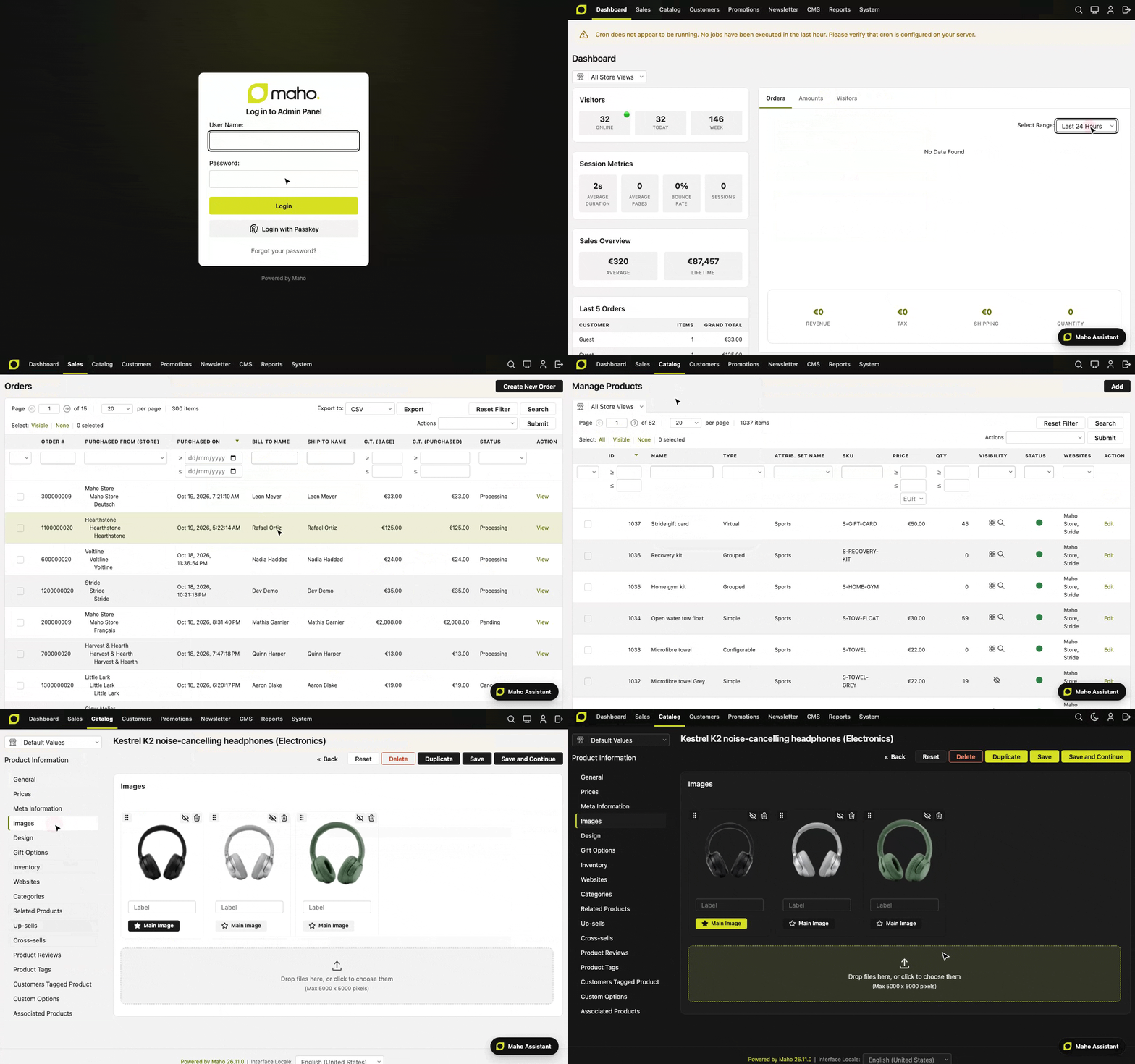
The admin has a new look. Buttons, form controls, checkboxes, messages, status labels, boxes, tabs, the main menu and the data grids now use daisyUI 5 components at a dense admin size, in light and dark mode. The admin skin gets its own Tailwind CSS 4 and daisyUI 5 build, like the storefront, compiled with the new ./maho dev:admin:theme:build.
- The login, forgot password, reset password and OAuth consent pages have a new design that fits a phone screen
- Product images on the product edit page are cards with a toggle for each role, drag to reorder (also from the keyboard)
- Button labels are short and consistent: "Save", "Delete", "Add", "Submit", "Save and Continue"
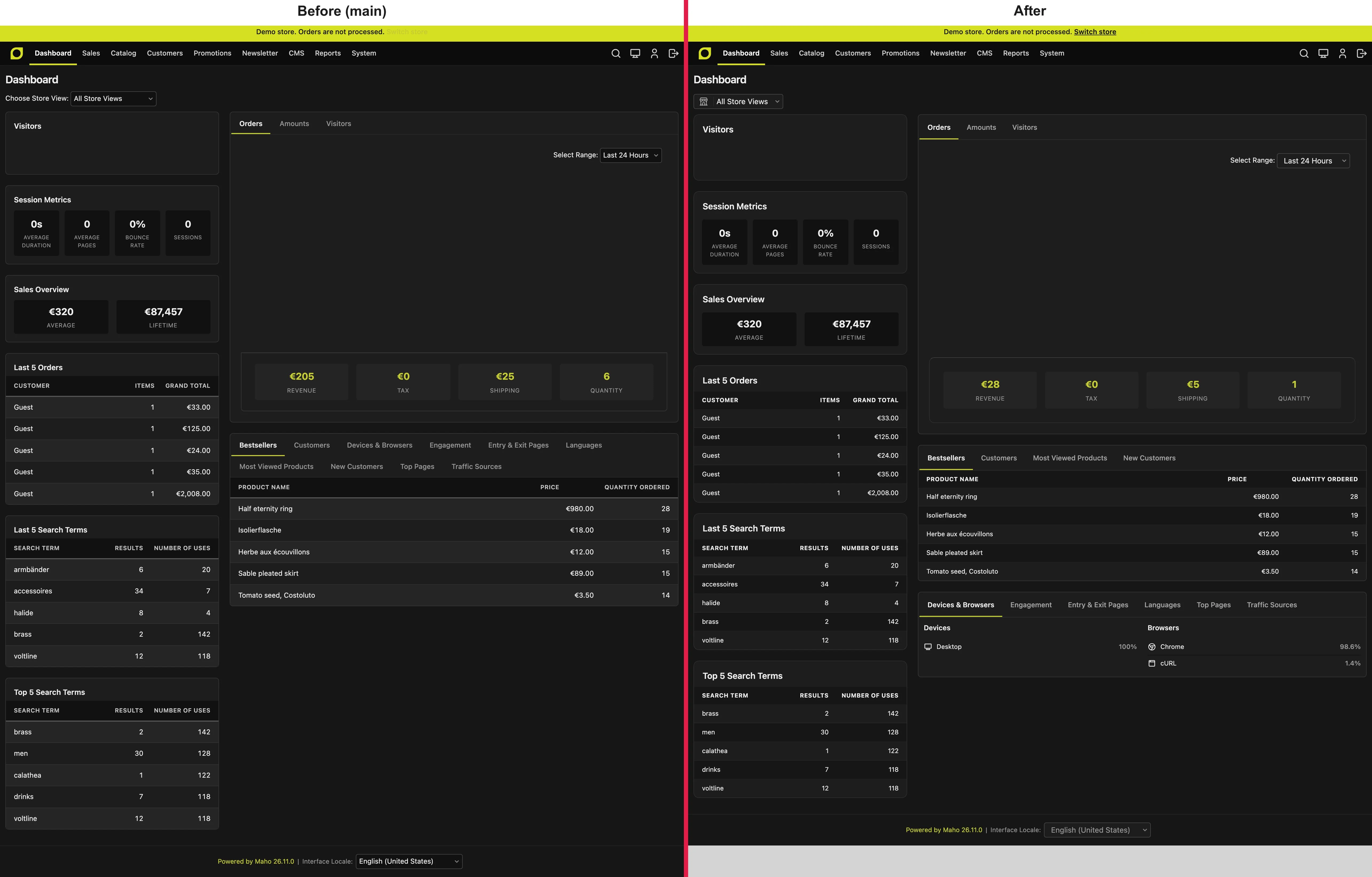
Building a custom admin theme? Start from the admin theme guide.
Product page gallery layouts and a new image editor
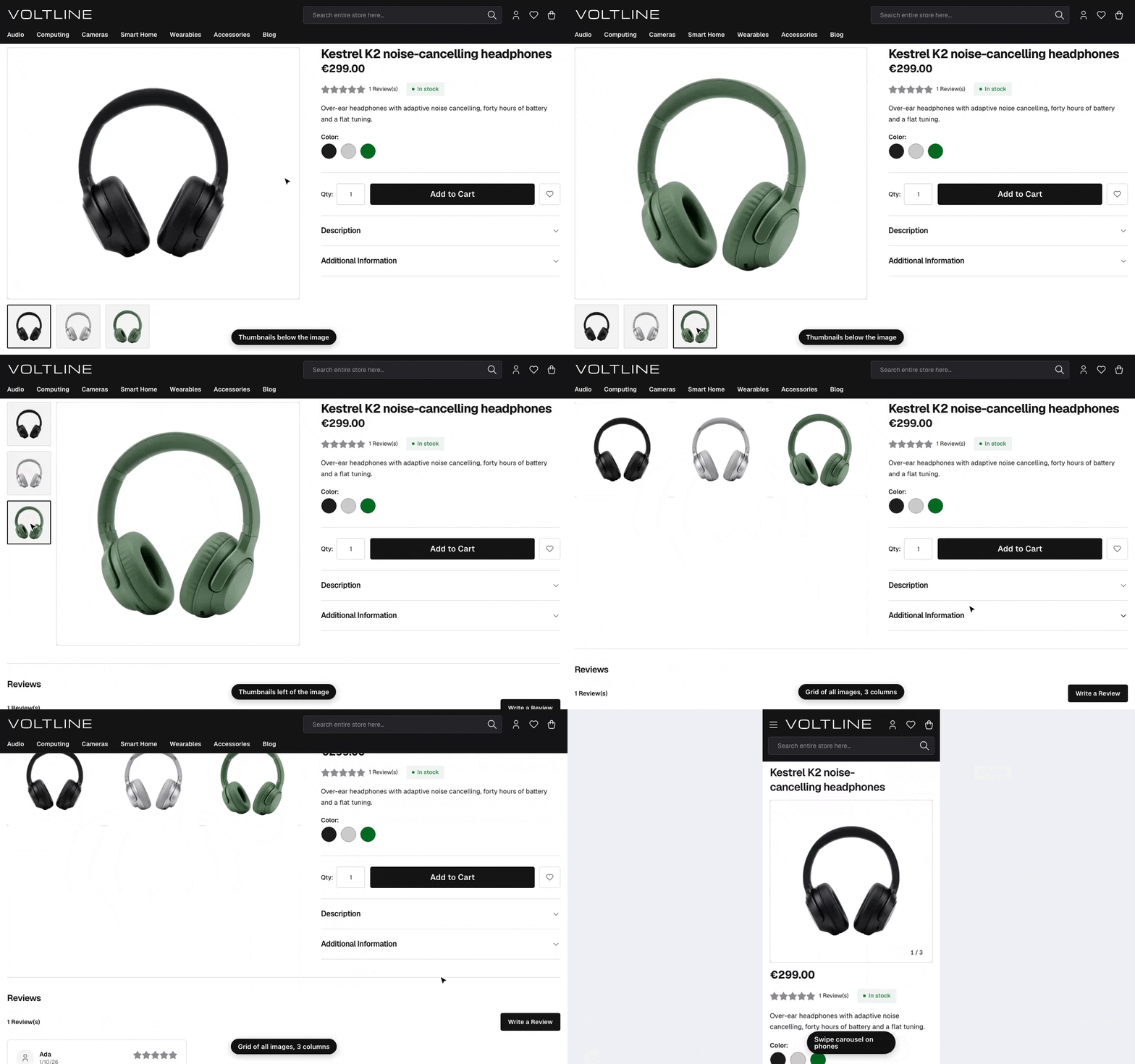
The product gallery now has layouts: thumbnails below, left or right of the image, or a grid of all images in 1, 2 or 3 columns, in System > Configuration > Design > Product Page Gallery. On phones, the gallery is now a swipe carousel with a counter.
Behind it, one Main Image per product: the old "Small Image" and "Thumbnail" roles only picked a size, so templates now name a slot (getImgAttributes('listing')), which writes src, srcset, sizes, width and height for you. The resized files of products, categories, blog posts and swatches are created on the queue when you save, so category and blog images are no longer served at their original size.
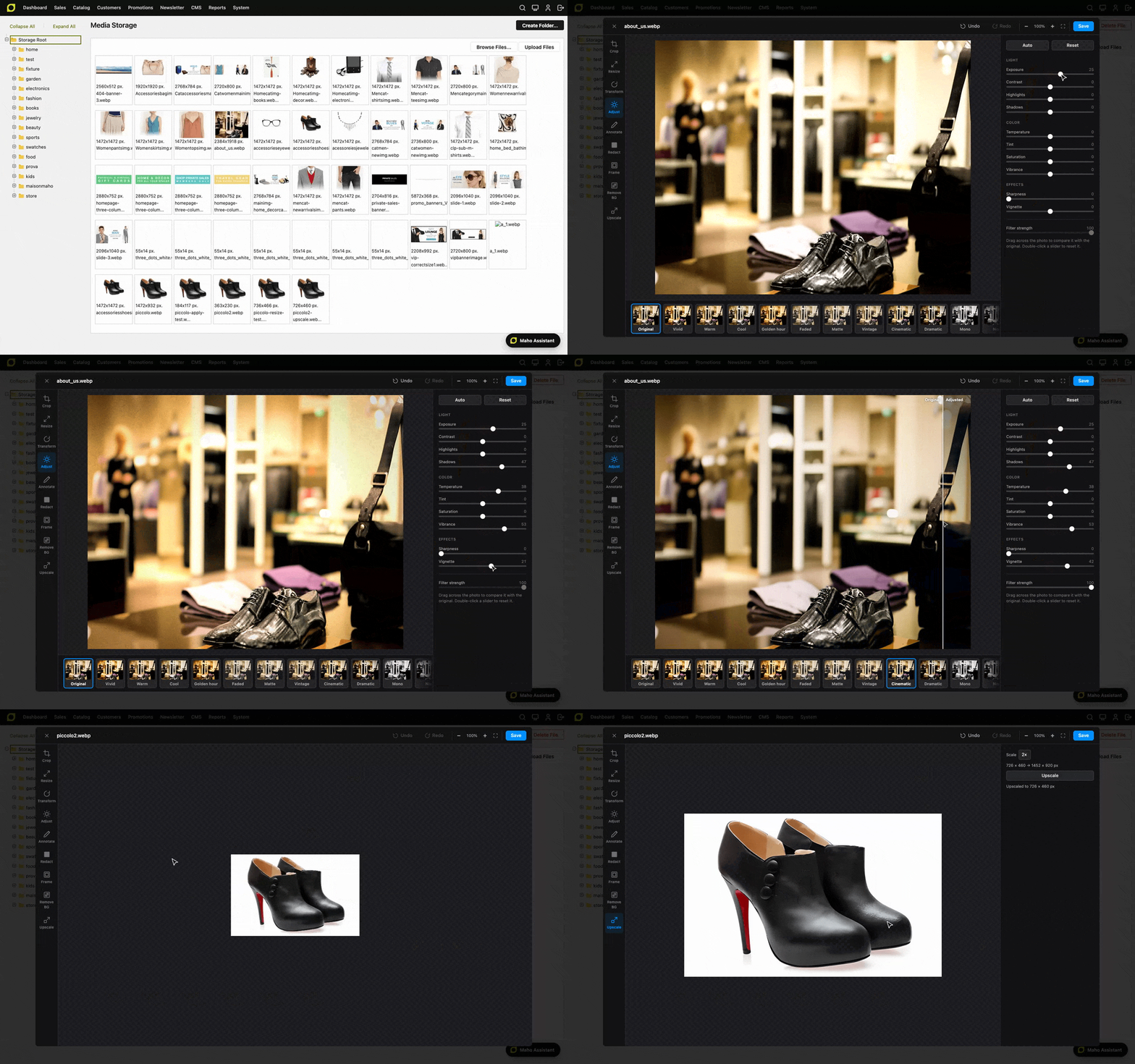
The admin image editor gets Upscale and a new Adjust tool: ten sliders in three groups, thirteen filters, a compare line to drag across the photo, and Temperature and Tint for a real white balance. Read the image editor guide.
PHP 8.5, Symfony 8.1 and API Platform 5.0
Maho moves its whole foundation one major version up. It now requires PHP 8.5.1, and runs on Symfony 8.1, API Platform 5.0 and Doctrine DBAL 4.5. The SVG sanitizer is rebuilt on the PHP 8.5 DOM and WHATWG URL parser, so it reads each link exactly as a browser does.
- API clients can search products with the HTTP QUERY method (RFC 10008) on
/api/products, with the filters in a JSON body - A new Scalar API Reference is at
/api/docs?ui=scalar, next to Swagger UI and ReDoc - Every CLI command is now a Symfony Console invokable command, and the test suite runs on Pest 5 and PHPUnit 13
Major, but not headline
- A full reindex three to five times faster: on the sample data store (1,040 products, 15 store views)
index:reindex:allgoes from 5.2 s to 0.95 s on SQLite, 4.54 s to 1.63 s on MySQL and 5.58 s to 1.09 s on PostgreSQL. Independent indexes run in parallel, and a URL rewrite rebuild sends 545 queries instead of 17,079 - Custom lines in admin order creation: "Add Custom Item" adds a line that is not in the catalog, such as an installation fee, a deposit or a made-to-order piece, with its own name, price, tax class and weight
- Country-aware postcode and region validation in checkout, the address book, registration and the admin, with the country first and an example postcode as the placeholder
- Deleted products answer 410 Gone instead of 404, so search engines drop the URL much faster
- A limit on the layered navigation filters a visitor can select (7 by default): bots that request every combination of filters get a 404 before the products load, and a real visitor never reaches it
- Long admin actions run in the background: exports, imports and product relationship rules no longer run inside the request, and the result arrives in System > Notifications
- The admin API covers most of the daily admin work: find orders, invoices, shipments, credit memos and customers like the admin grids do, manage cart price rules and coupons, read every report and the dashboard. Customer segments join the REST API and the MCP tools, and every API error now carries the status code of its meaning (404, 409, 422) instead of a generic 400
/.well-known/ai-catalog.jsonpoints AI agents to the MCP server card, and the OAuth approval screen now names the host that receives accessdb:exportanddb:importdump and restore the database with the native client of MySQL/MariaDB, PostgreSQL or SQLite, plus new CLI commands for exports, customer groups and customer addresses- Emoji save on MySQL and MariaDB: Maho now connects and creates tables with utf8mb4
- The flat catalog and recurring profiles are gone: the storefront always reads from the EAV tables, and no payment method in Maho could process a recurring profile since the legacy PayPal module went away
Upgrade notes
- Upgrade PHP to 8.5.1 or later first. On an older PHP,
./mahoand the store stop with a Composer platform error. - Back up the database. The image role migration and the removal of recurring profiles delete data and cannot be undone.
./maho migrateconverts every MySQL and MariaDB table to utf8mb4, third-party tables included. A large store needs a maintenance window: run./maho migrate --dry-runfirst.- Resized images: on nginx, add the rule for missing resized images from the web server guide. After the deploy, run
./maho storage:image:resizeonce, then flush the full page cache. - Cron and the queue workers must run: image resizes, exports, imports and rule applies now go through the queue.
- Every storefront POST needs a form key. Check the POST forms of your theme and the payment callbacks of your extensions;
./maho health-checklists the templates with a POST form and no key. - Run
./maho sys:playwright:installonce for the accessibility scanner. - Typed accessors on every
Mage_*class: an override with the old signature fails to load. The full list of removed classes and changed signatures is in the upgrade guide of the release notes.
Fixes, security and code quality
Some fixes deserve a line of their own. When two customers ordered at the same time, a concurrent price reindex could make one checkout fail after the payment: the order was saved and paid, but the customer saw an error and got no email. Free shipping and cart conditions are checked against the shipping address again, the PayPal buttons survive a short PayPal network error, logins and coupon codes match without regard to case on PostgreSQL and SQLite, and the WYSIWYG editor no longer depends on esm.sh being up.
On the security side, every storefront action that changes data now checks the form key in preDispatch(), instead of trusting each action to do it. Session messages are always escaped, file downloads and the image APIs cannot reach files outside their folder, downloadable links cannot fetch internal network addresses, emailed account links carry random tokens with rate limits, and email templates can no longer print an encrypted setting. Every release now ships maho-<version>.zip with its CycloneDX SBOM and signed build provenance, built by a workflow outside the repository for SLSA Build Level 3: gh attestation verify checks them.
And the codebase keeps getting cleaner: typed accessors are done. After the Maho_* models in 26.9.0, every Mage_* model, block and form element now declares real typed methods (2,239 accessors on 200 models in one pull request alone), and the 326 files that hold them declare strict_types. The Mage_Uploader module is gone, the code style moved to PER-CS 3.0, and a full CI run went from about 27 to about 15 minutes.
A warm welcome to our new contributor, @lstanghellini!
Be sure to check the full release announcement.
If Maho helps your business, consider supporting its development: