Shipping Bridge v26.3+
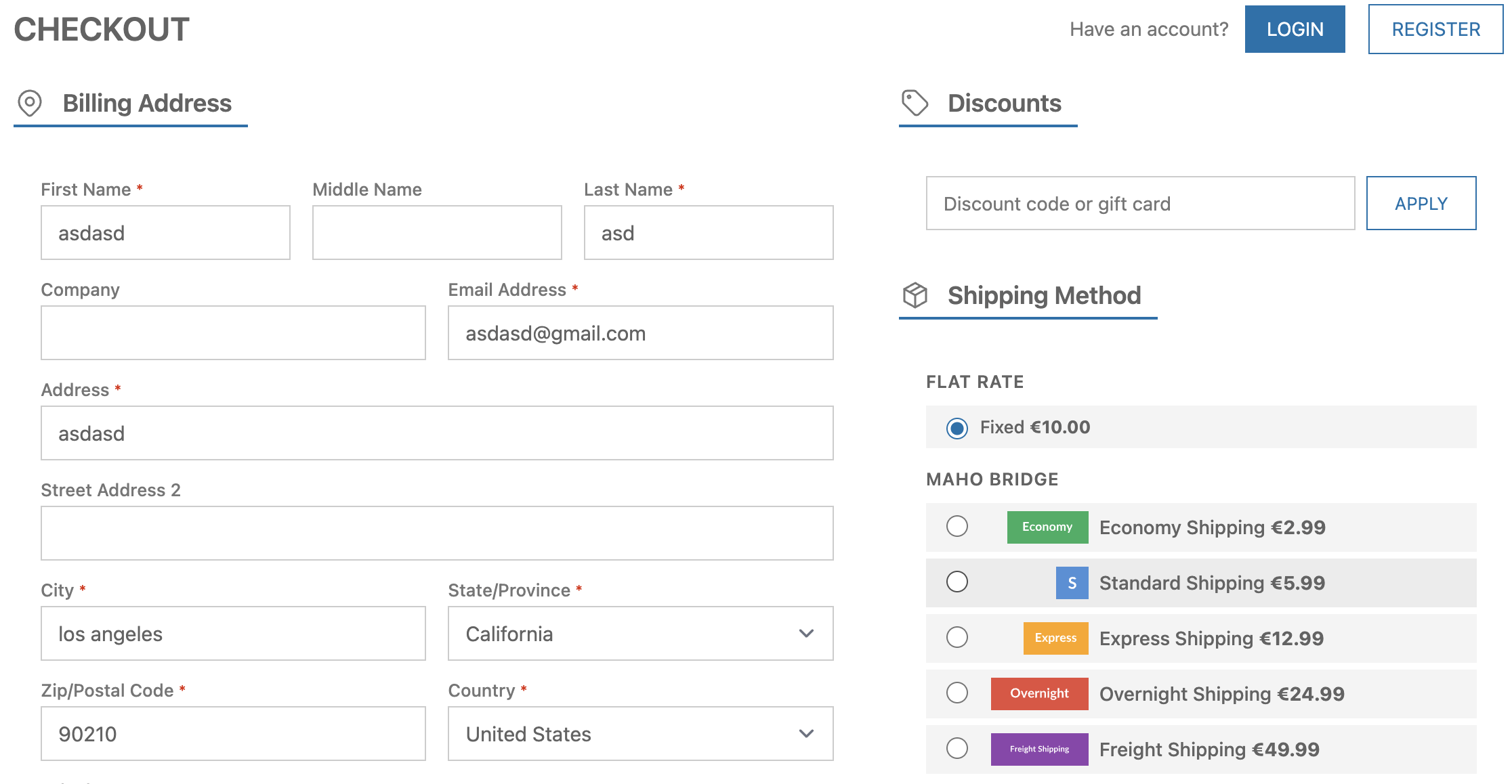
Maho's Shipping Bridge module lets you delegate shipping rate calculation to any external API. Instead of writing a custom carrier module, you configure a single API endpoint URL and Maho sends the full cart and address data as a JSON POST request, then renders whatever shipping methods the API returns.
Overview
Traditional carrier integrations require a dedicated module for every shipping provider. Shipping Bridge replaces that pattern with a single, generic connector:
- One module, any provider: Point it at a microservice, a serverless function, a third-party TMS, or your own ERP
- Zero code required: Everything is configured in the admin panel
- Rich payload: The API receives cart items, totals, shipping address, customer data, and any additional product attributes you select
- Flexible authentication: None, Bearer token, or custom header
- Multi-store support: Configuration is scoped per website
Use Cases
Third-party Shipping API
Connect to any shipping provider that offers a rate calculation API. Build a thin middleware that translates Maho's payload into the provider's format and returns the results.
Custom Business Rules
Deploy a serverless function (AWS Lambda, Cloudflare Workers, etc.) that implements your specific shipping logic -- zone-based pricing, weight tiers, customer group discounts, product category rules, or any combination.
ERP / WMS Integration
Point the endpoint at your ERP or warehouse management system to get real-time rates based on actual inventory locations and carrier contracts.
Multi-carrier Aggregation
Build a single endpoint that queries multiple carriers (UPS, FedEx, DHL) in parallel and returns the combined results as a unified list of methods.
How It Works
flowchart TD
    A[Customer enters checkout] --> B[Maho collects rates from all active carriers]
    B --> C[Shipping Bridge sends a POST request to your configured API endpoint]
    C --> D[Your API returns JSON with shipping methods]
    D --> E[Methods appear in checkout alongside other carriers]
Configuration
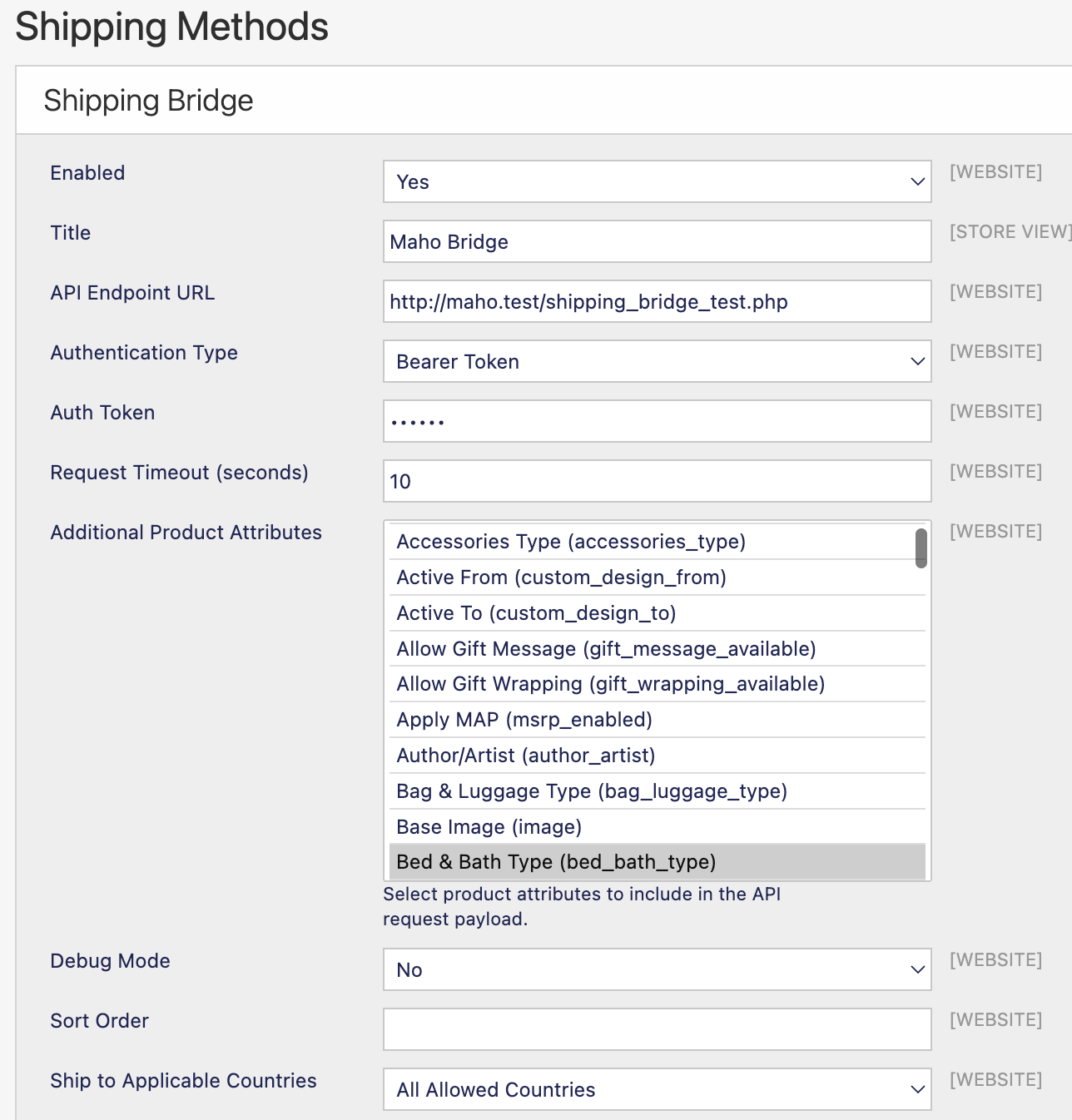
Navigate to System > Configuration > Sales > Shipping Methods > Shipping Bridge.
Settings Reference
| Setting | Description | Scope |
|---|---|---|
| Enabled | Activate the carrier | Website |
| Title | Carrier title shown in checkout (e.g. "Express Shipping") | Store View |
| API Endpoint URL | The URL Maho will POST to | Website |
| Authentication Type | None, Bearer Token, or Custom Header | Website |
| Auth Token | Token value (encrypted in database) | Website |
| Custom Header Name | Header name when using Custom Header auth (e.g. X-Api-Key) | Website |
| Request Timeout | Seconds to wait for a response (max 60) | Website |
| Additional Product Attributes | Extra product attributes to include in the request payload | Website |
| Debug Mode | Log full request/response to var/log/shipping_bridge.log | Website |
| Sort Order | Position among other shipping methods | Website |
| Ship to Applicable Countries | All countries or specific countries only | Website |
| Ship to Specific Countries | Country whitelist (when above is set to specific) | Website |
| Displayed Error Message | Shown to customers when the method is unavailable | Store View |
Authentication Types
- None -- No authentication header is sent
- Bearer Token -- Sends
Authorization: Bearer <token>header - Custom Header -- Sends a custom header, e.g.
X-Api-Key: <token>. The header name must contain only letters, numbers, and hyphens.
Additional Product Attributes
By default each cart item includes sku, name, qty, weight, price, and row_total. If your API needs more data (e.g. color, manufacturer, shipping_class), select those attributes in the Additional Product Attributes multiselect. They will be appended to each item in the request payload.
For select and multiselect attributes, both the raw value and the admin label are sent:
For all other attribute types the raw value is sent directly.
API Contract
Request
Maho sends an HTTP POST with Content-Type: application/json.
{
  "cart": {
    "items": [
      {
        "sku": "shirt-red-m",
        "name": "Classic T-Shirt",
        "qty": 2,
        "weight": 0.5,
        "price": 29.99,
        "row_total": 59.98,
        "color": { "value": "25", "label": "Red" },
        "size": { "value": "168", "label": "M" }
      }
    ],
    "totals": {
      "subtotal": 59.98,
      "weight": 1.0,
      "qty": 2
    }
  },
  "shipping_address": {
    "firstname": "John",
    "lastname": "Doe",
    "street": "123 Main St",
    "city": "Portland",
    "region": "Oregon",
    "region_code": "OR",
    "postcode": "97201",
    "country_id": "US"
  },
  "currency": "USD",
  "store_id": 1,
  "customer": {
    "customer_id": 42,
    "email": "[email protected]",
    "group_id": 1,
    "group_code": "General",
    "is_guest": false
  }
}
Request Fields
cart.items[]
| Field | Type | Description |
|---|---|---|
sku | string | Product SKU (for configurables, this is the simple product SKU) |
name | string | Product name |
qty | float | Quantity |
weight | float | Unit weight |
price | float | Unit price |
row_total | float | Line total |
| additional | mixed | Any attributes selected in configuration |
cart.totals
| Field | Type | Description |
|---|---|---|
subtotal | float | Cart subtotal |
weight | float | Total weight |
qty | float | Total item count |
shipping_address
| Field | Type | Description |
|---|---|---|
firstname | string | First name |
lastname | string | Last name |
street | string | Street address |
city | string | City |
region | string | Full region/state name |
region_code | string | Region code (e.g. "OR") |
postcode | string | Postal/ZIP code |
country_id | string | ISO 2-letter country code |
customer
| Field | Type | Description |
|---|---|---|
customer_id | int/null | Customer ID (null for guests) |
email | string | Email address |
group_id | int | Customer group ID |
group_code | string | Customer group code (e.g. "General", "Wholesale") |
is_guest | bool | Whether the customer is a guest |
Response
Your API must return JSON with a methods array. Each method needs code, title, and price. Optional fields: cost, description, logo.
{
  "methods": [
    {
      "code": "standard",
      "title": "Standard Shipping (5-7 days)",
      "price": 5.99,
      "cost": 3.50,
      "description": "Delivered by USPS",
      "logo": "https://example.com/usps-logo.svg"
    },
    {
      "code": "express",
      "title": "Express Shipping (1-2 days)",
      "price": 14.99,
      "cost": 10.00
    }
  ]
}
Response Fields
| Field | Type | Required | Description |
|---|---|---|---|
code | string | Yes | Unique method identifier |
title | string | Yes | Label shown to the customer |
price | float | Yes | Price charged to the customer |
cost | float | No | Internal cost (defaults to price if omitted) |
description | string | No | Additional description |
logo | string | No | URL to a carrier/method logo image |
Error Handling
- Non-2xx status codes: No shipping methods are shown; an error is logged
- Invalid JSON: Logged as an error; no methods shown
- Missing
methodsarray: Logged as an error; no methods shown - Individual method missing required fields: That method is skipped with a warning; other valid methods still appear
Return an empty methods array if no shipping options are available:
Configurable Product Handling
For configurable products, the request payload includes:
- The configurable product's name and price
- The selected simple product's SKU
- Super attributes (the attributes used to configure the product, e.g. color, size) are always included automatically, resolved from the selected child product
- Additional attributes are resolved from the child product first, falling back to the parent if the child doesn't have a value
Ship-Separately Items
When a bundle or grouped product is configured to ship items separately, each child item is sent as its own entry in the items array with the combined quantity (parent qty * child qty).
Debug Mode
When Debug Mode is enabled, full request and response payloads are logged to var/log/shipping_bridge.log. This is useful during initial integration but should be disabled in production to avoid logging sensitive customer data.
Example log entries: