Structured Data v26.7+
Maho emits schema.org structured data (JSON-LD) into your storefront pages: products, breadcrumbs, organization info, site search, and blog posts. This markup is what makes your store eligible for rich results in Google Search, powers Google Merchant listings (price, availability, shipping and returns shown directly in search), and is read by AI assistants and shopping surfaces when they present your products.
The module is enabled by default and works with no configuration. The settings on this page make the product markup complete: with them in place, Google can show your price, availability, shipping cost and return policy without a Merchant Center feed, and validate your feed against your pages when you have one.
As of v26.9 the product markup covers Google's full core product set: seller, item condition, price validity, shipping details, return policy, and variant markup for configurable products.
Where everything lives
The module settings sit in System > Configuration > Catalog > Catalog > Structured Data (schema.org):
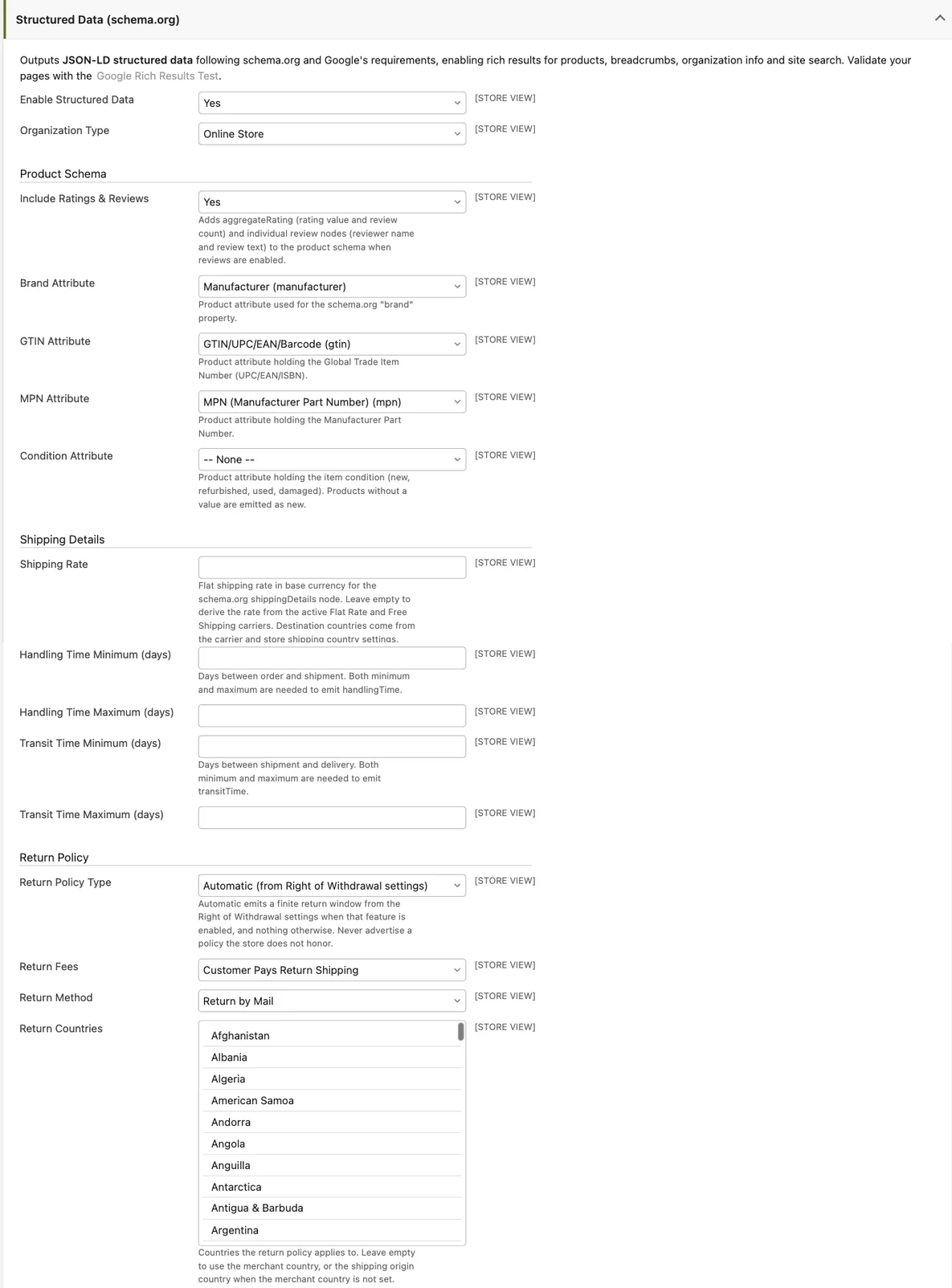
| Field | Default | What it does |
|---|---|---|
| Enable Structured Data | Yes | Master switch for all JSON-LD output. |
| Organization Type | Online Store | The schema.org type of your organization node. |
| Include Ratings & Reviews | Yes | Adds aggregateRating and review nodes to the product schema. |
| Brand Attribute | manufacturer | Product attribute used for brand. |
| GTIN Attribute | gtin | Product attribute holding the UPC/EAN/ISBN. |
| MPN Attribute | mpn | Product attribute holding the Manufacturer Part Number. |
| Condition Attribute v26.9+ | (none) | Product attribute holding the item condition. Products without a value are emitted as new. |
| Shipping Rate v26.9+ | (empty) | Manual flat shipping rate override, in base currency. Empty derives the rate from your carriers. |
| Handling Time Minimum / Maximum (days) v26.9+ | (empty) | Days between order and shipment. Both are needed to emit handling time. |
| Transit Time Minimum / Maximum (days) v26.9+ | (empty) | Days between shipment and delivery. Both are needed to emit transit time. |
| Return Policy Type v26.9+ | Automatic | How the return policy is built (see below). |
| Return Window (days) v26.9+ | 14 | The window, when the type is Finite Return Window. |
| Return Fees v26.9+ | Customer Pays Return Shipping | Who pays return shipping. |
| Return Method v26.9+ | Return by Mail | How customers return items. |
| Return Countries v26.9+ | (empty) | Countries the policy applies to. Empty derives them (see below). |
The markup also reads settings you have probably already configured elsewhere. Check these, because they directly shape what is emitted:
| Setting | Location | Feeds into |
|---|---|---|
| Display Product Prices In Catalog | Sales > Tax > Price Display Settings | Whether emitted prices include tax (they follow the page). |
| Store Name | General > General > Store Information | The seller and organization name. |
| Country (merchant country) | General > General > Store Information | Return policy country fallback. |
| Allowed Shipping Countries | General > General > Countries Options | Shipping destination and return policy countries. |
| Origin > Country | Sales > Shipping Settings | Last-resort shipping destination and return country. |
| Flat Rate carrier (Enabled, Price, Handling Fee) | Sales > Shipping Methods | The derived shipping rate. |
| Free Shipping carrier (Enabled, Minimum Order Amount, Ship to Applicable Countries) | Sales > Shipping Methods | A free (0.00) shipping rate above the threshold. |
| Revocation Button (Enabled, Cooling-Off Period) | Sales > Revocation Button | The Automatic return policy. |
Prices follow the page v26.9+
Emitted prices are in the customer's display currency and follow your tax display mode (Sales > Tax > Price Display Settings > Display Product Prices In Catalog). A store that displays prices excluding tax now emits excluding-tax prices; "Including Tax" and "Including and Excluding Tax" both emit including-tax prices. This is what Google requires: the structured-data price must match the price visible on the page.
Behavior change on upgrade
Before v26.9 the JSON-LD price always included tax. If your store displays prices excluding tax, the price your pages emit changed with the upgrade. If you also submit a tax-inclusive feed to Google Merchant Center, the page and the feed now differ: re-check your Merchant Center diagnostics after upgrading and align your feed's tax settings with your catalog display settings.
Every offer also carries priceValidUntil, which Google recommends:
- A product with an active special price that has an end date emits that end date.
- A special price scheduled to start in the future caps the regular price's validity at the day before it begins.
- Otherwise a rolling fallback of today plus 30 days is emitted.
Product identity fields
- brand, GTIN and MPN come from the product attributes you map in the settings above. A product without a value in the mapped attribute simply omits the field.
- The GTIN is emitted to the length-specific property (
gtin8,gtin12,gtin13,gtin14) based on its digit count, exactly as entered; other values use the genericgtinproperty. Maho does not validate checksums: Google Merchant Center is the validator and reports invalid GTINs there. - itemCondition v26.9+ comes from the attribute you select as Condition Attribute. Recognized values are
new,refurbished,usedanddamaged(plus common synonyms such as "pre-owned"). Products with no value, or with an unrecognized value, are emitted as new, so stores that only sell new goods need no attribute at all. Map an attribute only if you sell refurbished, used or damaged items. - seller v26.9+ is your store's organization node, named from General > General > Store Information > Store Name.
Shipping details v26.9+
Each offer can carry an OfferShippingDetails node with the shipping rate, the destination countries, and optionally handling and transit times. Maho only emits the node when it can state an honest rate and a real destination; it never invents one. The node is omitted for virtual and downloadable products.
The rate is resolved in this order:
- The Shipping Rate field, when set: a flat amount in base currency, converted to the display currency.
- The Free Shipping carrier, when enabled and the product's price meets the Minimum Order Amount (or no minimum is set): rate 0.00. For configurable products this is checked per variant, so cheap and expensive variants can carry different rates.
- The Flat Rate carrier, when enabled: its Price plus its Handling Fee.
- Otherwise no node is emitted. Stores using only table rates or live carrier rates have no single honest per-product rate, so set the Shipping Rate override if you want the node.
The destination countries are resolved in this order:
- The rate-source carrier's Ship to Specific Countries list, when "Ship to Applicable Countries" is set to Specific Countries.
- Allowed Shipping Countries (General > General > Countries Options).
- The shipping Origin Country (Sales > Shipping Settings).
- If none resolves, the node is omitted, because Google requires a destination.
Handling and transit times are emitted only when you fill in both the minimum and the maximum for each range.
Return policy v26.9+
Each offer can carry a MerchantReturnPolicy node, controlled by Return Policy Type:
- Automatic (from Right of Withdrawal settings) - the default. When the Revocation Button feature is enabled (Sales > Revocation Button) and its Cooling-Off Period is above zero, the policy is a finite return window of that many days. When Revocation is disabled, nothing is emitted: a stock install never advertises a return policy it does not honor.
- Finite Return Window - a fixed window using the Return Window (days) field.
- Unlimited Return Window - returns accepted at any time.
- Returns Not Permitted - explicitly states that returns are not accepted.
- Do Not Emit - no return policy node at all.
Except for "Returns Not Permitted", the node also carries Return Fees (Customer Pays Return Shipping, or Free Return) and Return Method (by Mail, in Store, at Kiosk). The countries the policy applies to come from Return Countries, or when empty: your Allowed Shipping Countries, then your merchant country (Store Information), then the shipping origin country.
Never advertise a policy you do not honor
Google treats the return policy in structured data as a merchant statement. Pick the type that matches your actual terms and conditions, and keep the window in sync with them.
Variants of configurable products v26.9+
Configurable products emit ProductGroup + hasVariant, Google's supported variant markup:
- The parent becomes a
ProductGroupwithproductGroupID(the parent SKU) andvariesBy(the configurable attributes, for example color and size). - Each enabled variant (up to 100) is a
Productnode with its attribute values, its own image (or the parent's when it has none), its identifiers, andinProductGroupWithIDpointing back to the group. - A variant that is visible in the catalog on its own also carries its own
url. - Each variant's offer advertises the price the buyer actually pays at checkout: the parent's price plus the configured option price adjustments. The variant's own price attribute is never advertised, because checkout never charges it.
Why is a field missing? (troubleshooting)
| Missing field | Check this |
|---|---|
| The whole JSON-LD block | Enable Structured Data = Yes; flush the Configuration cache. |
| brand / gtin / mpn | The mapped attribute is selected in the settings, and the product has a value in it. |
| gtin13 shows as gtin | The value is not a 8/12/13/14 digit number. Fix the value; Merchant Center reports invalid GTINs. |
| shippingDetails | A rate must resolve (Shipping Rate override, or Free Shipping / Flat Rate carrier enabled) and a destination country must resolve. Virtual and downloadable products never carry it. |
| handlingTime / transitTime | Both the minimum and the maximum of the range must be filled in. |
| hasMerchantReturnPolicy | In Automatic mode, Revocation Button must be enabled with a Cooling-Off Period above zero. Otherwise pick a manual policy type. |
| hasVariant / ProductGroup | Only configurable products emit it, and at least one enabled, in-website variant must exist. |
| A variant's url | The child product's Visibility is "Not Visible Individually", so it has no page of its own. |
| aggregateRating / review | Include Ratings & Reviews = Yes, the Reviews module is active, and the product has approved reviews. |
Recommended setup
- Open System > Configuration > Catalog > Catalog > Structured Data (schema.org) and check that it is enabled.
- Identity: verify the Brand, GTIN and MPN attribute mappings match the attributes your catalog actually uses. If you sell non-new goods, create a condition attribute (values: new, refurbished, used, damaged) and select it as Condition Attribute.
- Seller: fill in General > General > Store Information (Store Name and Country).
- Shipping: confirm Sales > Shipping Settings > Origin > Country and your Allowed Shipping Countries. If you use Flat Rate or Free Shipping, the rate derives automatically; otherwise set the Shipping Rate override. Optionally fill in the handling and transit day ranges you quote to customers.
- Returns: if you use the Revocation Button, keep Automatic. Otherwise select the policy type, window, fees and method that match your written terms.
- Tax: confirm Sales > Tax > Price Display Settings reflects how you really display prices, since emitted prices follow it.
- Save, flush the Configuration cache, and validate a product page with the Google Rich Results Test. If you use Google Merchant Center, check its diagnostics a few days later.
For developers
Every JSON-LD graph passes through an event before rendering (maho_structureddata_product_data, _organization_data, _article_data, and so on), so a module can enrich or suppress the output without overriding templates.